Skip navigation

OpenCV is a programming library for computer vision routines. As I’m doing my undergrad research in UPD-DCS’ Computer Vision and Machine Intelligence Group (CVMIG), I recently had the need to install OpenCV in Ubuntu.

Perhaps the most obvious way—yet most troublesome as well—to install OpenCV in Ubuntu would be to compile it from source. I started using Ubuntu March 2010 but, to date, I still haven’t installed anything successfully via build from source. So, I’m not dwelling on that here. Building from source isn’t a quick and easy way by any means.

The instructions at Ubuntu’s Community Documentation is, by far, the easiest way I’ve found. However, the last sudo apt-get install line mentioned—the one that’s supposed to install all the OpenCV goodness into your system—fails with the error message “Couldn’t find package libcv2.1”.

Maybe it used to work, back when OpenCV was just version 2.1. Unfortunately, as of this writing, OpenCV is now in version 2.3. To remedy the apparently outdated Community Docs, head over to Ubuntu’s package information page for OpenCV and sudo apt-get install all the packages mentioned there. So the last line with which I’m having issues with becomes (as of this writing!):

sudo apt-get install libcv-dev libcv4 libcvaux-dev libcvaux4 libhighgui-dev
libhighgui4 opencv-doc python-opencv

Note that the package info page link I gave is for Lucid since I’m in Lucid. There are links for the corresponding packages for other supported and LTS versions in the page. Click the one that suits you.

Running the examples

The Community Docs have instructions on how to run the examples. However, I stumbled on build_all.sh as, apparently, on the first iteration of the script’s compile loop, it misconcatenates strings and tries to compile something called .c.c. I tried to compile each file individually to which my terminal gave me the following:

$ gcc -o squares squares.c
squares.c:12:16: error: cv.h: No such file or directory
squares.c:13:21: error: highgui.h: No such file or directory

Followed by more lines of error which, as far as I can tell, should go away had these two libraries linked properly. While it may initially seem (as it did to me) that OpenCV failed to install properly, this is actually just some quirk with C’s compilation process. I remember having this problem with math.h and that is, as far as I understand, a standard C library at that.

When I realized this, I opened build_all.sh in GEdit and found how to invoke gcc/g++ so that the examples compile. Invoke gcc as:

gcc -ggdb `pkg-config opencv --cflags --libs` inputfilename.c -o outputfilename

Same thing works for the .cpp files (C++ source codes) but don’t forget to invoke g++ instead of gcc!

More musings:

  • The first command the Community Docs asks you to do is sudo su which makes you a root/superuser in the command line. From there you should be able to execute protected commands even without the sudo invocation. Hence, the sudo calls in the subsequent lines shouldn’t be necessary, though it won’t hurt to have them.
  • On why the most troublesome method is the most obvious one. Google “install opencv ubuntu” and the first link that will discuss installation without compiling the code is at position 6, and it is outdated at that (yep Community Docs, I’m still looking at you). Even the official OpenCV installation manual tells you to build from source. I know that it is bothersome to write an installation how-to for every Linux distro out there and that not all of them probably support sudo apt-get install, and for those non-Ubuntu distros that do, they probably do not connect to the Ubuntu package repos and so there may be a discrepancy or two that needs to be addressed. However, I specifically searched for Ubuntu instructions. I love Ubuntu and all the geekery that goes with it but I am of the opinion that if Ubuntu is really to be user-friendly, the easy methods should be the most obvious ones.
UPDATE: Having problems making your DDLs utilizing foreign keys work with InnoDB? This may answer some questions.

In retrospect, I made the same mistake when I asked that at SO as when I made this post. The errant statement when I made this post is

CREATE TABLE IF NOT EXISTS timelogs(
timestarted DATETIME NOT NULL,
timeended DATETIME NOT NULL,
taskid INTEGER NOT NULL,
PRIMARY KEY (timestarted),
FOREIGN KEY (taskid) REFERENCES tasks);

No column reference.


Note: This post is a summary of this Ubuntu Forums Programming Talk thread. With special thanks to nklatt for asking the questions which led me to my resolution.

I’ve been working on a JDBC-backed application. Since I am familiar with MySQL, the MySQL Connector/J comes as a natural choice for a database driver. Since I’m using Java, I expected my code to run on both Linux and Windows environments.

Testing it with Vista, it runs well. However, when I tested it in Ubuntu, I was greeted with the following error:

java.sql.SQLException: Can't create table 'dbname.timelogs' (errno: 150)

Googling around, I found this which says that this error happens since MyISAM, the default storage mechanism used by MySQL, doesn’t support foreign key constraints. And yes, I am using foreign keys in my tables. Also, a quote from the official MySQL docs says,

Foreign key constraints are supported for the InnoDB storage engine only. For other storage engines, the foreign key syntax is correctly parsed but not implemented.1

I checked the tables created at Vista and found out that they use the MyISAM storage engine as I expected since I didn’t specify any storage engine in my CREATE statement and so should fall back to the default. This made me wonder all the more why didn’t it throw the error in Vista when MyISAM isn’t supposed to support foreign key constraints.

At this point, I must note that Vista runs XAMPP 1.7.3 while Ubuntu runs version 1.7.4 . I didn’t think that my XAMPP version will matter—after all, Vista is only a version behind. Spoiler: I thought wrong.

I changed my CREATE statements such that they explicitly specify the InnoDB storage engine. I ran my modified code in Vista and, surprisingly, Vista threw the very error Ubuntu does.

Confused, I switched back to Ubuntu and, for the first time in this bug-hunt, checked the table created2 at phpMyAdmin (I have two tables in my database, only one of which specifies a foreign key. The one without the foreign key gets created, of course). I discovered that MySQL 5.5.8 (the MySQL server that comes with XAMPP 1.7.4) actually defaults to InnoDB and not to MyISAM3.

So it turns out that, weirdly, the InnoDB storage engine was the one causing all my problems despite the documentation declaring that it supports (in fact, it is the only storage engine that supports) foreign key constraints. Resolution: stick with MyISAM since that is where my code runs, despite the fact that it doesn’t really support foreign key constraints.

(In any case, the user will interact with the DB through a GUI. So, it’d be more or less the GUI programmer’s fault, i.e. me, if some record doesn’t make sense. Sigh. So much for being a one-man team.)

  1. http://dev.mysql.com/doc/workbench/en/wb-foreign-key-relationships.html , retrieved 6/22/11, 11:09PM GMT+8. []
  2. This was still the one created by the code not specifying any storage engine causing MySQL to default. []
  3. If you read the thread I linked above, nklatt pointed this out beforehand for MySQL 5.5 . []

Remember my portfolio website? The one I mentioned here? Well, it’s now up and accessible at kode.skytreader.net. There isn’t much there yet because I tried to make it a point not to link to school work1 but please feel free to look around the various things I craft. The CSS should look good for all browsers except IE. This is my first attempt at tableless layout and, man, IE really is a pain in the ass to work with. The main domain (www.skytreader.net) uses tables, unfortunately.

In other news, I’ll be doing my thesis/special problems course this year. I don’t know how much time will I be able to squeeze in for personal projects. I expect {kode.play();}2 to be as much in thesis mode as me. In any case, I can still consider my thesis as a personal project, don’t you think?

(By the way, by some turn of events, I’ll be doing my thesis alone. At least, so long as the list of accepted students released by the research lab I applied to doesn’t change. I guess that just makes my thesis all the more a personal project.)

And as for my n-puzzle solver? I haven’t had time to look into IDA*, as I planned in my previous post. The time I spent working on it the past two weeks or so, I spent on ways researching how to decrease the heat generated by my laptop’s CPU. I’ve cleaned the dust bunnies and all but it still overheats to the point of auto-shut down even when I’m just browsing the web, though so far that has only happened in Windows Vista. I’m pretty adamant continuing to force my laptop to its limits since I’ll be doing my thesis this year and being laptop-less is the last situation I would like to find myself in.

(It’s been raining real heavy the past few days though and I noticed that my laptop is going easy on heating up. Could all those auto-shut down heat-ups be due to the hot summer weather? That’s funny since I had this laptop since last year’s summer and it didn’t auto-shut down at all then. And last year’s summer was way hotter, I tell you.)

Aside from my thesis, I’m taking my Artificial Intelligence course this semester. Maybe, hopefully, there really is still something I missed from A*. Having someone explain it to you really makes a lot of difference from self-studying. Hopefully, by semester-end, my n-puzzle solver can solve a randomly-generated solvable instance.

That’d be all for now. See you soon.

  1. Okay, this breaks for GradeGrid but I invested so much time in it it’s good as personal as well. []
  2. Yep, that’s the new official spelling :D []

It seems that I’m done coding the A* search of my n-puzzle solver. I spent almost all of last week doing it, as I discovered that there are some flaws in my understanding of A*.

The web doesn’t seem to have a lot of resources on A* compare to, say, graph algorithms. Google “a* search” and the only relevant link you’ll get is the first hit, a Wikipedia article at that. The second search hit, remarkably funny (for me, at least), is a search engine for cemetery records. The best search terms seem to be either “a* search algorithm” or “a* searching algorithm“. And even at that, not all the hits in page one have something to do with A*. Compare with, say, googling for “bellman ford” to find resources on the Bellman Ford algorithm. The best A* resource for beginner’s that I found on the the web will be this.

I said that my A* seems to work because I haven’t managed to make it solve randomly generated solvable instances yet; solving time takes too long that my computer heats up so much to the point of auto shut down. I’ve managed to get it to solve an instance with a Manhattan distance of 11 but I haven’t tried anything further than that yet (the randomly generated instances of size n=15 usually take a Manhattan distance of around 30, give or take).

I wonder how things would’ve went if I implemented my search in Java instead of Python. I remember, when I ran a (hopelessly inefficient) Java brute-force Sudoku solver in my old HP Pavilion DV1000 (default specs, i.e., Windows XP Home Edition, 1.5GHz processor, 512MB RAM), I managed to keep it up for hours, though, to make things fair, I did that in an air-conditioned room. For comparison, I ran my A* on a Gateway T-series (can’t give exact model as it is not available on surface inspection, sorry), running Ubuntu 10.04 (Lucid Lynx) with AMD Turion 64 X2 (approx 2GHz) processor and 2GB RAM, room temperature.

Maybe, I’ll look into Iterative Deepening A* next with some time.sleep lines thrown in the code to allow time for my system to cool down. Stay tuned.

Wow it’s over. What started as a personal challenge turned into a seven-week Android adventure. Oh what fun.

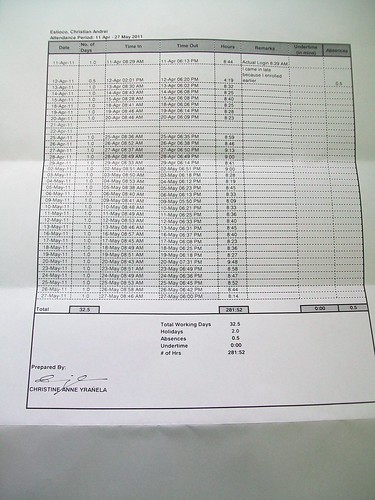
My Azeus Work Log

We were only required to do 180 or 240 hours (one of those, I'm not really sure). But I clocked in around1 281:52.....YEEEEEAAAAHHHHH!!!!!

Flashback to last school year’s first semester, I did plan to take a summer internship but I didn’t really plan to take it at Azeus. Come to think of it, I never really had any plans on where I’ll take my internship. A joke we had around then was to take our internship at UPD’s CRS so that we can (illegally) tweak chances to our favor. When I took Azeus’ first exam, it was more like a personal challenge than anything internship-related. “Let’s take the exam,” I urged my friends, “so that we’ll know how entrance-job exams go.”

And so we did and I managed to take my internship at Azeus.

I don’t know how finished a product did we make out of our project. From my point of view, I’d give it at around 70%. Of the two features left assigned to me, I only managed to finish one 100%. Some misadventures with base codes and networking delayed me but finish it, I did, albeit untested thoroughly. The other one I’d give at around 60%. It had two bugs that really bugged me: a one-shot-big-shot dropping action key listener and a networking function that is a little too responsive for my liking.

I’m happy with how my internship turned out. Throughout my seven-week stay at Azeus, I managed to apply lessons which I thought I won’t be able to use after passing the courses concerned. I designed a (scrapped) statistical ranking system and had some (geeky) fun with percentiles and normal distributions.  I debugged a lot of networking/threading issues that cropped up in my code, applying concepts from my OS and Computer Networks class in the process. I have further proved that learning through experience, in a real-world context, beats textbooks all the time.

(And least people start saying “See? Theory courses (algorithms class, ahem) don’t really play much in the industry. So why bother?”: During our group technical interview—part 2 of Azeus’ three-stage selection process—I used dynamic programming to solve the problem they gave us. In our batch, I was the only one who managed to solve the given problem *wink*)

We ended our internship with Build 6, if I remember correctly, which is more or less everything we managed to code sans the show-stopper non-working functions.

And party.

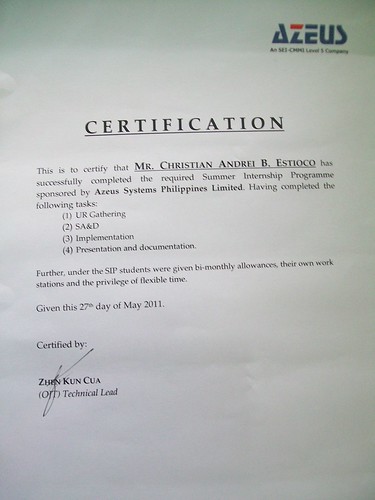
Ha! Pizza + Ice Cream. Shame that I was too busy getting more pizza than anyone else socializing to take pictures. But anyway, they gave certificates…

My Azeus Certificate

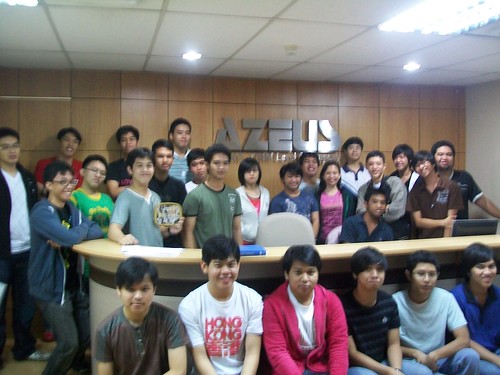
And we had some pictures taken…

Azeus Internship 2011

I was in a hurry when I snapped this shot so it turned out blurred :C

And so it ends. It was a fun seven weeks. Surely, I wasn’t exaggerating at the title I gave for this post.

And now, to enjoy my break…

~ The Chad Estioco, logging-out for the last time (this summer, at least).

Jolly Me

This is probably the happiest picture snapped this summer. What's funny about this is the fact that we just ate at McDonald's moments before this photo was taken. One of us was even holding a Coke Float!


  1. I say around because we log-in using a biometric fingerprint scanner while we log-out using a computer terminal. I noticed that the time in the fingerprint scanner and in the computer is out-synced by around 2-3 minutes. []