Skip navigation

For February I tinkered with Django, arguably the most popular web framework for Python. Prior to this, the only web framework I’ve had experience with is CodeIgniter and one proprietary JSP-based framework.

In an earlier post I covered installing Django. Nothing much has changed between then and now except that the most recent version of Django, 1.5, now supports Python 3! The first for Django ever. But I’m sticking with Python 2 for the time being.

Note: I tried learning Django last August, in an afterthought project with goals loftier than what my resources could have achieved. Needless to say, I never got too far with it. It was this which prompted me to specify a mini-project I’d use to learn web frameworks (any web framework). I’m not sharing the specifics of it now but you can gather what you can in my sandbox repository.

The Admin Site

One nifty feature of Django is how it creates an admin site automatically for you. On my CodeIgniter projects, I’d pattern the users table something like this, borrowing from Linux file systems:

CREATE TABLE IF NOT EXISTS users(
    -- Some project-specific fields here
    create_time TIMESTAMP NOT NULL,
    last_updater INTEGER NOT NULL,
    last_update TIMESTAMP NOT NULL,
    can_read BOOLEAN NOT NULL DEFAULT TRUE,
    can_write BOOLEAN NOT NULL DEFAULT TRUE,
    can_exec BOOLEAN NOT NULL DEFAULT FALSE,
    PRIMARY KEY (userid),
    FOREIGN KEY (last_updater) REFERENCES users (userid)
    -- Yes, apparently, MySQL allows you to foreign key recursively
);

If I’m really feeling up to it, or if the project requires (never had it tho), I might even implement user groups. But even with this, I can already define 23=8 types of users, which is already way more than what one project usually requires. What I’d normally do here is to designate can_exec privileges to admins. Way neater than maintaining different tables for different user types and then giving admins backdoor log-in pages—one of the naive approaches I used when I first started designing databases for apps.

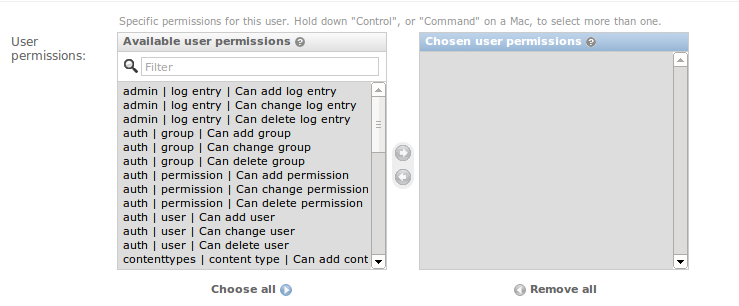
Django automatically covers this for you, user permissions, groups, and all. The structure becomes a bit different though, and I find permission management way more complicated than my binary-scheme. Take a look at all possible user permissions in Django:
django_permissions

Look at how many that is, and realize that there is still a scroll bar!

What Django basically did is to allow you to specify add/change/delete permissions for every table in your database. Note that due to how Django enforces code modularity (see below), the number of tables in your database could easily blow-up.

Code Modularity

Perhaps one of the most confusing things I encountered as I tried to learn Django was how it distinguishes the terms “project” and “app”. Normally, I’d talk about an “app” being a “project” for some party. But in Django a project is a collection of apps. I had a hard time designing my project around these terminologies even after reading discussions at StackOverflow until I realized that perhaps a better term for “app” would’ve been “plug-in” and there’s really nothing stopping you from making your project as one big plug-in.

With the side-effect, of course, of your app being non modular and probably not well-factored. So, yes, the way Django handles things enforces the nice practice of modularity. Nice to take advantage of it, though it may be too time-taking to wrap your design around Django’s rules.

Django also enforces a form of Object-Relational Mapping (ORM). In fact, you don’t need to write a single line of actual SQL code to get your database up and running—all DB creation is done through the ORM and manage.py . This even allows you to easily switch DB back-ends. Then again, as with above, not all projects would fit well for an ORM approach.

Overall?

I find Django pretty neat given that you only need minimal set-up for this whole bunch of admin stuff. But then I haven’t had much time to explore it although I’ve volunteered in a (non-work, non-paid) project that might use Django pretty extensively. Guess I’ll get more Django this month. Let’s see.

There. I beat my deadline. The main site is live again! Yay!

But that is not to say that I got this without glitches. Let’s see…

After feeling good with the WordPress site I developed locally, I pushed it live by uploading all my local files (and changing password-related configs) to my server. However, I noticed that all my links start with “localhost”—they are pointing to the local version I developed. The only page I can view from my remote site was the home page.

The fix is easy enough. I just had to change all option values in the wp_options table of my WP site so that they don’t refer to localhost. To that end I ran the following query in my database:

UPDATE wp_options
SET option_value = REPLACE(option_value, 'localhost/', '');

Note: be careful when running queries like this. The pattern matching went fine for me but some future version might use the term ‘localhost’ for something else. Always back-up before running! Also, you could’ve set this option up in your WP Admin. Just go to Settings -> General and change the URL-related settings. I wasn’t able to do it in this case because even the WP Admin was getting redirected to localhost!

So, after running that, I got my links good. However, clicking on the links returned a status 500 error (Internal Server Error)!

Googling around, it seems that this has something to do with my .htaccess . The .htaccess is a config file for web servers famous for allowing URL rewriting. It’s the magic behind http://skytreader.net/journal/post-title instead of http://skytreader.net/journal/post-title.php. You can also do cool (or sick, depending on your tastes) things with it like having pages with a .exe extensions (or pointing unsuspecting users to a normal .html page but is actually a sketchy .exe download). Here’s one tutorial I’m quite fond of.

Anyway, my .htaccess looked like, this:

<IfModule mod_rewrite.c>
RewriteEngine On
RewriteBase /skytreader.net/
RewriteRule ^index\.php$ - [L]
RewriteCond %{REQUEST_FILENAME} !-f
RewriteCond %{REQUEST_FILENAME} !-d
RewriteRule . /skytreader.net/index.php [L]
</IfModule>

Now, I had no idea what to do with my .htaccess to prevent the status 500 from happening. Thank goodness that kodeplay itself is WordPress-powered. So, I just patterned it from kodeplay’s .htaccess:

<IfModule mod_rewrite.c>
RewriteEngine On
RewriteBase /
RewriteRule ^index\.php$ - [L]
RewriteCond %{REQUEST_FILENAME} !-f
RewriteCond %{REQUEST_FILENAME} !-d
RewriteRule . /index.php [L]
</IfModule>

Aaaaannnd voila! Main site up and running! (Though, I won’t be surprised if there are still bugs with my launch.)

It seems that WordPress has a tutorial for migrating WP set-ups. Guess I should’ve read that first no?

Now, a TODO: Write a new entry on my main blog. The most recent one is now more than a year old!

Okay. I know it’s already February and that it’s kinda late. But it’s in times like this that I say “better late than never!”. But as I’ll show, I’ve already started with my resolutions—I’m just writing about them now.

But since this is my coding blog, the resolution I will mention here will be my technical-life resolution (as opposed to the personal ones everybody makes). So, without further ado…

I resolve to learn a new technology every month. Or, at least, get deeper with one I’m already acquainted with.

Also, I’d go into programming competitions/contests again. Team requirements limit my choices but, hey, there are a lot I can do alone online, not to mention free! (Though if anyone wants to team-up with me, let’s talk.)

And, just so I’ll stick with it, I’ll write a blog post every month about what I’ve been up to. Consider this the one for January.

For my first resolution, I created this sandbox repository at GitHub. And since my GitHub account is, in itself, already my sandbox of sorts, I guess this is some sandbox-ception eh?

January, I did sockets in Python. I didn’t manage to dig as deep as I’d have wanted because the Facebook Hacker Cup kicked in earlier than I expected and that falls under my second resolution. So it had to give way. Besides, I’m already dealing with a few sockets too many at work.

Regarding my second resolution, I don’t really expect much from it. At least, I won’t get rusty from the lack of problem sets in the real world (read: industry). At most, I might score a free trip to some world finals. But that world-finals scenario is still very out of my league. I’ve been doing ACM-ICPC problems since I was in my sophomore year in College and even now I find most of them really tough and tricky. Also, after less than a year out of school, I’m bound to have some rust in my system (not that school is a sure fire way to keep you sharp though). I only decided to start practicing with my algorithms sometime in December so there isn’t really much to expect.

(Note: I started writing this post in the last hour before the first round of Hacker Cup started. It’s now over and everything fell within my expectations. There’s a lot to learn. Maybe, I’ll write about this soon.)


So, what do I think about sockets in Python? (This will be short since, as mentioned, I didn’t have much time to dig deep into this.)

As with all things Python, it looks super neat. I got a client and server up and running in just 41 lines of code combined. The biggest savings comes from the fact that socket I/O is direct in Python; you no longer have to create OutputStream and InputStream objects as the socket objects themselves have methods for sending and receiving. It’s also interesting to note that Python’s socketserver class has a serve_forever method which, as the name implies, handles requests as long as it can (the official phrase is: “until an explicit shutdown signal is received”).

Oddly, this design reminds me how I handled one of the things I did at work. Won’t go into the details but I thought that it’s neat to have one class responsible for managing one whole session: packet numbers, windowing, etc. One instance of a class maps to one client; when client goes away so does this instance (at least, I no longer care if the garbage collector marks it as garbage). Makes OO live more peacefully with concurrency.

Awesome that Python enforces this design by default. Really, the more I discover about Python, the lovelier programming gets.

‘Till I get my February experiments done! ~Chad

Still working on my revisions for my personal site. It was on full throttle last December but had to take a backseat due to work and something I’m preparing for. Oh well…I’m trying to meet a personal deadline of end-of-this month to mid-February (Feb 16! Mark the concrete date!).

It’s not exactly a tough project but, being the OC guy I am, I’m making sure all ends are ironed well and that’s what’s taking my time. To meet my deadline, I had to cut certain pages (not posts) for which I only have a vague idea as to the content they’ll hold. It feels so long since I did some creative writing.

Now, I ran into a problem removing them from my nav bar (since I don’t want users to see not-even-baked pages, right?). I thought that marking them as “draft” would do the trick. However, they remained on my nav bar.

I’ve been looking into the database and how WP queries for the navbar’s contents, to no avail. There are forum posts regarding this, both I’ve found to be two years old, not to mention not-at-all helpful. That’s when I realized that, last December, I was able to customize my nav bar from the CMS itself, as opposed to hacking the code.

appearance_menus

After some clicking-around the CMS I found what I’m looking for in “Menu” under the “Appearance” tab. You should see some click-and-drag interface for managing what appears on your navbar.

It seems that publishing a page automatically adds it to your navbar but marking it as “draft” does not trigger anything. To make things worse, users not logged-in as an author will hit a 404 if they click a “draft” link. If you are a registered author on the WP site concerned, you’ll still see the actual content. Tsk. First timers might miss the fact that their users will hit a 404.

That’s all for now. Keep coding ~Chad.

So, I noted here the hell I went through just to get Windows 8 to dual-boot with Ubuntu 12.04. However, just today, I had another problem with it.

To recap, I settled with my system unable to load Windows 8 from GRUB. I resorted to using rEFInd to be able to choose between Ubuntu and Win8. This isn’t a very clean solution as my Ubuntu option at rEFInd still loads GRUB (as opposed to having Ubuntu straightaway) but hey, it works.

Well, just this morning, as I booted into Ubuntu, I was greeted by a message from rEFInd which, in essence, tells me that Secure Boot is not allowing me to load grubx64.efi . Puzzled as it was only last night that I used Ubuntu, I did not see any cause to panic as the workaround is something I’ve mastered during my previous tussle with Secure Boot: I just need to (re)authorize grubx64.efi from my BIOS.

I rebooted to do this. However, when I booted into Ubuntu, I was greeted with a message that really made me panic. It read,

error: Secure Boot forbids loading module from (hd0, gpt7)\boot\grub\normal.mod

grub rescue>

Like, what the hell is normal.mod, much more (hd0, gpt7)?! I’ve encountered hd’s and gpt’s in my readings during my dual boot session last time but they were never really clearly explained and I haven’t bothered to look into them deeply.

After moving around (very carefully!) around my BIOS, I noticed two things:

  1. Some new entries has been added into my boot order list and it has definitely changed. I remember leaving the Windows Bootloader at the bottom of the list but it is now at the top of the list; and,
  2. There is an option to disable Secure Boot.

Yes. I don’t know why I haven’t noticed that I can disable Secure Boot before but disable it, I did. I can now boot into Ubuntu again. What’s more is that it fixed the rather-convoluted set-up I had with rEFInd: I can now boot into Windows 8 from GRUB though it still shows some errors which I can bypass with just a button press.

So, is Secure Boot actually good for anything aside from annoying people and wasting time?